



GET 10% OFF ON FIRST ORDER.
Subscribers and get a new discount coupon on every Month.
Fast Shipping Across the USA
10% Off on First Order
Fast Shipping Across the USA
10% Off on First Order
Fast Shipping Across the USA
10% Off on First Order
Fast Shipping Across the USA
10% Off on First Order
Fast Shipping Across the USA
10% Off on First Order
Fast Shipping Across the USA
10% Off on First Order
Fast Shipping Across the USA
10% Off on First Order
Fast Shipping Across the USA
10% Off on First Order
Fast Shipping Across the USA
10% Off on First Order


Couldn't load pickup availability


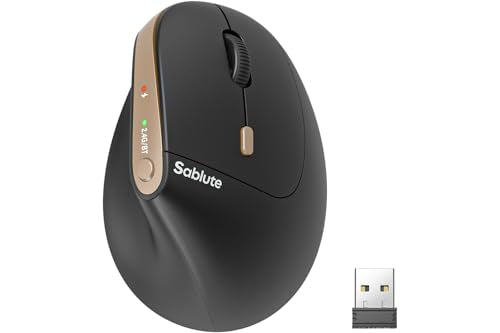
Color|Black|Connectivity Technology|Bluetooth, Usb|Special Feature|Ergonomic Design, Rechargeable, Soundless|Movement Detection Technology|Optical.
Optimized For Small To Medium Hands: The Wireless Mouse For Laptop Has 7 Silent Button Keys Layout (Bluetooth/Dpi) Switch Fit Small And Medium Hand, Comfortable Grip Without Fatigue.
Ergonomic Vertical Design To Relieve Wrist Strain: The Wireless Mouse Features A Scientifi Multiple-Device Wireless Connection Plug-And-Play: This Bluetooth Mouse Can Connect To 3 Devices Simultaneously Via Both Bluetooth And A Usb Receiver. With Just One Click, You Can Switch Seamlessly And Without Lag Between A Computer And An Ipad, Significantly Enhancing Your Work Efficiency.Note: Press Once For Bluetooth Mode. Hold 35 Seconds Until The Blue Light Flashes For Pairing Mode.
Rechargeable Battery Automatic Sleep Mode: Equipped With A Built-In Rechargeable Battery, This Computer Mouse Offers An Extended Battery Life, Eliminating The Need For Disposable Batteries. Its Advanced Auto Power-Saving Mode Kicks In After Periods Of Inactivity, Achieving An Incredible 300-Day Standby LifeSo You Can Say Goodbye To Constant Charging And Battery Waste.
Adjustable Dpi Silent Click: Easily Switch Between Four Dpi Settings (800/1200/1600/2400) To Choose Your Perfect Cursor Sensitivity For Smoother And More Precise Tracking. The Mouse'S Clicks Are 90% Quieter, Allowing You To Maintain Focus And Work Without Disturbing Others.
Support: We Offer A 12-Month And Dedicated Technical Support. If You Have Any Questions, Our Us-Based Support Team Is Here To Provide Prompt Assistance. If This Is Your First Time Using An Ergonomic Vertical Mouse, It Might Take A Few Days To Get Used To. We Recommend Using It For 3 To 7 Days To Fully Adapt. Many Users Find That After This Adjustment Period, The Vertical Mouse Significantly Reduces Wrist Pressure And Pain Caused By Prolonged Computer Use .


Thanks for subscribing!
This email has been registered!