



GET 10% OFF ON FIRST ORDER.
Subscribers and get a new discount coupon on every Month.
Fast Shipping Across the USA
10% Off on First Order
Fast Shipping Across the USA
10% Off on First Order
Fast Shipping Across the USA
10% Off on First Order
Fast Shipping Across the USA
10% Off on First Order
Fast Shipping Across the USA
10% Off on First Order
Fast Shipping Across the USA
10% Off on First Order
Fast Shipping Across the USA
10% Off on First Order
Fast Shipping Across the USA
10% Off on First Order
Fast Shipping Across the USA
10% Off on First Order



Couldn't load pickup availability


Color|Gray|Connectivity Technology|No Connectivity|Special Feature|Portable|Movement Detection Technology|Optical.
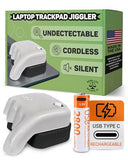
Touchpad Jiggler Keeps Your Laptop Touchpad Active Without Requiring A Mouse. Good For Maintaining Continuous Productivity During Remote Work Or Wfh, Ensuring Your Screen Stays Awake Without Interruptions.
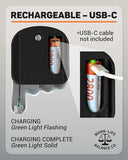
Rechargeable Usb-C Rechargeable For Easy Power-Up. Enjoy Up To 170 Hours Of Use On A Single Charge. Simply Charge For 1.5 Hours Weekly For Optimal Performance And Hassle-Free Operation Without Constantly Replacing Batteries.
Cordless Design No Tangled Cables Or Connections. The Cordless Design Offers Easy Portability And Keeps Your Workspace Clean And Clutter-Free, Making It The Ideal Trackpad Tech Solution For On-The-Go Professionals.
Easy To Use Simply Place The Magic Hand On Your Touchpad And Press The On/Off Button To Start Or Stop The Device. Keep Your Computer Active With This Simple And Intuitive Automatic Wiggler.
Silent Operation Experience Quiet Operation With A High-Quality, Low Rpm Motor. This Undetectable Mechanical Mover Keeps Your Computer Active Without Disturbing Your Workspace During Remote Work Or Laptop Tasks.
Touchpad Settings Tip For Best Results, Maximize Your Touchpad Sensitivity (Settings ≫ Bluetooth Devices ≫ Touchpad ≫ Most Sensitive) And Disable Palm Rejection Features Such As Palmcheck, Smartsense, Or Accidental Touch Filtering. Some Windows Precision Touchpads Have Built-In Software That May Filter The Jiggler'S Gentle Mechanical Input. See Our Troubleshooting Image In The Product Photos For A Step-By-Step Guide To Optimize Your Settings For Reliable, Uninterrupted Cursor Movement.


Thanks for subscribing!
This email has been registered!